/> pic controller: April 2010


Wednesday, April 28, 2010

Get your free E-Book: The GNU/Linux Advanced Administration


The GNU/Linux systems have reached an important level of maturity, allowing to integrate them in almost any kind of work environment, from a desktop PC to the sever facilities of a big company.

In this ebook "The GNU/Linux Operating System", the main contents are related with system administration. You will learn how to install and configure several computer services, and how to optimize and synchronize the resources using GNU/Linux.

The topics covered in this 500+ page eBook include Linux network, server and data administration, Linux kernel, security, clustering, configuration, tuning, optimization, migration and coexistence with non-Linux systems. A must read for any serious Linux system admin.

Get your free ebook Get it now

Check current availability!

Tuesday, April 27, 2010

What is new in Fedora 13 ?


Automatic Print Driver Installation : gutenprint-packages such as cups, hpijs and pbm2l2030 must be installed on demand when the hardware that require drivers are detected.

Color Management : Color Manager GNOME session is a framework that makes it easy to handle, install and create color profiles in the GNOME desktop

Easier Debugging Python : The gdb debugger has been extended so that it can communicate detailed information about the inner workings of Python 2 and Python 3 runtimes 

3D Support: In Fedora 12 experimental support for 3D through-mesa-dri package-experimental drivers for ATI cards became available and has been expanded in Fedora 13 to support the systems through Nouveau Nvidia Driver.

PulseAudio Integration KDE  : Fedora 13 offers a better integration of PulseAudio in Phonon KDE and KMix

Bluetooth DUN NetworkManager: NetworkManager now supports easy-to-use Bluetooth Dial-Up Networking (DUN) support.

Include include Gnome 2.30.

Mobile NetworkManager Status : The NetworkManager applet shows the current signal strength, technology (GPRS / EDGE / UMTS / HSPA or 1x/EVDO etc), and roaming status while connected to the cards which support this functionality.

Fedora 13 SC have KDE 4.4, GNOME 2.30, support NFSv4, RPM 4.8, support both Python 3 and Python 2.x, OpenOffice.org 3.2.0, the Sugar desktop 0.88 (famous for its integration into the XO laptop One Laptop Per Child project), Firefox 3.6.2, and Upstart 0.6.0.

Monday, April 26, 2010

Typing Tutor for ubuntu / Debian Linux : Klavaro


Klavaro is a FREE Software for learning Typewriting. It will help you to learn Typewriting in systematic way, quickly and correctly in QWERTY keyboard. It also support other languages and keyboard formats.

Klavaro Features:
* Internationalization
* Ready to use keyboard layouts
* Basic course
* Adaptability exercises
* Velocity exercises
* Fluidness exercises
* Progress charts
* Keyboard Layout Editor
* Semi-online contest
* Clean graphical interface

How to install in Ubuntu / Debian
$ sudo apt-get install klavaro

If you want to run semi online contest you have to install libcurl3

$ sudo apt-get install libcurl3

Controlling LCD using BASCOM and AVR

Controlling LCD using BASCOM and AVR
Bascom can handle the two main types of liquid-crystal displays: alphanumeric and graphic. For the time being we will concern ourselves with the most common alphanumeric type. This type of LCD can display characters, numbers and special characters. The most common type of alphanumeric LCD uses a Hitachi HD44780 as display controller. When you are uncertain about what type of display you are holding in your hands, simply look at the chip designations on the back. If one of these says HD44780 you're safe.

Fortunately, the default is set to LCD type 16*2. This is the most common LCD with two lines and 16 characters per line. HD44780 type LCD's have eight datalines, but they can be controlled in a more economical way by using the four 'upper' lines. This saves four i/o pins on your controller. This is the default (4-bit bus mode) in the options window. Sending data in the 4-bit bus mode of course takes two writes for each 8-bits to send. If you really need the LCD to be as fast as possible (and you seldom do) you will have to choose the 8-bit bus mode.

source : qsl.net

Wednesday, April 21, 2010

Computer Controlled Battery Manager

Computer Controlled Battery Manager
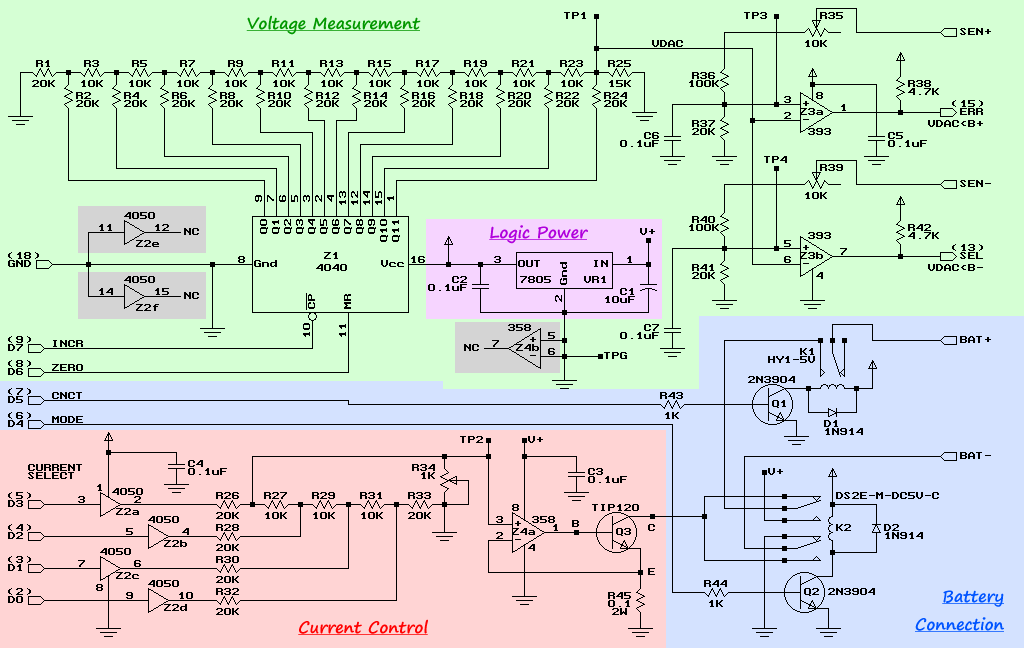
BattMan II is a computer controlled battery manager, intended for typical rechargeable batteries used by R/C and electronics hobbyists, as well as various consumer product batteries.

BattMan II has the following capabilities:
  • Works with Nickel-Cadmium (NiCd), Nickel-Metal-Hydride (NiMH), Lithium-Ion (Li-Ion), Lithium-Polymer (LiPo), Lithium-Nano-Phosphate (LiNP), and Lead-Acid (Pb-Acid) batteries of 1.2 to 14.7 Volts.†
  • Discharges batteries to measure capacity at rates of 130mA to 2A.
  • Charges at rates of 130mA to 1.3A.†
  • Automatically performs repeated discharge/charge cycles to break in new batteries, or erase NiCd voltage depression in old ones.
  • Measures internal resistance.
  • Monitors self-discharge.
  • Real time graphical display lets you see problems like mismatched cells.
  • Keeps a log of all operations performed, which can be imported into any spreadsheet program.
  • Saves graphs of charge, discharge, auto-cycle, and monitor operations.
  • Connects via parallel port to any PC running Microsoft Windows (95, 98, ME, 2000, XP, or Vista).
  • Operating software, complete with source code, is available to download.
Download schematic and software
releated search: Electronic Circuit Project, Battery manager (src)

Monday, April 19, 2010

Kerala Entrance Exam 2010 (KEAM 2010) Answer Key And Solutions Published

Kerala Entrance Exam 2010 (KEAM 2010) Answer Key And Solutions  Published


Tell your Friend about this site . This site is exclusively designed for Engineering Students. www.keralalinux.com

Kerala Entrance Exam 2010 Answer key and Solution will be published . For answer Key and solutions please keep in touch regular on this site. Official site of CEE will publish after 21-04-2010. Some other sites are under the preparation of key. So please keep in touch regular on this site.

Friday, April 16, 2010

How to Install Viewnior awesome image viewer for ubuntu linux


Viewnior is  an image viewer program. It is simple, fast and elegant. It's simple interface provides more screenspace for your images. Among its features are:

* Fullscreen & Slideshow
* Rotate, flip, crop, save, delete images
* Animation support
* Browse only selected images
* Navigation window
* Set image as wallpaper (only under GNOME)
* Simple interface
* Configurable mouse actions

Viewnior is licensed under the terms of the GPLv3.

 How to Install Viewnior in Ubuntu

$sudo add-apt-repository ppa:xsisqox/ppa
$sudo apt-get update
$sudo apt-get install viewnior

Thursday, April 15, 2010

dstat - Versatile resource statistics tool for Ubuntu / Debian Linux

Dstat is a versatile replacement for vmstat, nfsstat, iostat, netstat and ifstat. Dstat covers some of their limitations and adds some extra features and flexibility. Dstat can easily monitor systems during performance tuning tests, benchmarks or troubleshooting.
Dstat allows you to view all of your system resources instantly, eg. compare disk usage in combination with interrupts from your IDE controller, or compare the network bandwidth numbers directly with the disk throughput (in the same interval).
  • dstat_app - the most expensive process on the system
  • dstat_battery - the percentage of battery charge (needs ACPI)
  • dstat_cpufreq - the CPU frequency (needs ACPI)
  • dstat_dbus - the number of dbus connections (needs python-dbus)
  • dstat_freespace - see the disk usage per partition
  • dstat_gpfs - the GPFS read/write IO
  • dstat_gpfsop - the GPFS filesystem operations
  • dstat_nfs3 - the NFS v3 client operations
  • dstat_nfs3op - the extended NFS v3 client operations
  • dstat_nfsd3 - the NFS v3 server operations
  • dstat_nfsd3op - the extended NFS v3 server operations
  • dstat_postfix - counters of the differnt queues (needs postfix)
  • dstat_rpc - RPC client calls
  • dstat_rpcd - RPC server calls
  • dstat_sendmail - counters of the queue (needs sendmail)
  • dstat_thermal - CPU temperature
  • dstat_utmp - number of utmp sessions (needs python-utmp)
  • dstat_wifi - wireless link quality and signal/noise ratio (needs python-wifi)
Install dstat in ubuntu 9.04

$sudo apt-get install dstat
eg:
$ dstat -M time,cpu,net,disk,sys,load,proc,topcpu

See more here

Wednesday, April 14, 2010

Tutorial on Usage of Tar utility in Ubuntu/Debian/Mandriva/Fedora/OpenSuse Linux

A linux power user must know about the file compression utility tar. tar is used to store and extract files from and to an archive file. Mainly source codes distributed in tar format. Here some examples of tar usage

Create ( Archive) a tar file from a set of files :

tar -cvf tarfile.tar /var/log/samba /var/log/messages

Create a gzip file from a set of files (.tar.gz file):

tar -cvzf file.tar.gz /var/log/samba /var/log/messages

create bzip2 file from a set of files (.tar.bz2 file):

tar -cvjf file.tar.bz2 /var/log/samba /var/log/messages

Display the content of an ordinary tar file:

tar -tvf filename.tar
tar -tvzf filename.tar.gz
tar -tvjf filename.tar.bz2

Extract an ordinary tar file:

tar -xvf filename.tar
tar -xvzf filename.tar.gz
tar -xvjf filename.tar.bz2

Replace a file in an existing tar file:

tar -rvf tarfile.tar filetoreplace

Update a file in an existing tar file:

tar -uvf tarfile.tar newfile

Tuesday, April 13, 2010

Monitor system Status with saidar in ubuntu / debian Linux


saidar  is  a text based  tool for viewing the system statistics available through libstatgrab. Statistics include  CPU,  processes, load, memory, swap, network I/O, disk I/O, and file system information.

how to install saidar in ubuntu / debian
$ sudo apt-get install saidar

Monday, April 12, 2010

Arduino Duemilanove Project Board

Arduino Duemilanove Project Board
The Arduino Duemilanove ("2009") is a microcontroller board based on the ATmega168 (datasheet). It has 14 digital input/output pins (of which 6 can be used as PWM outputs), 6 analog inputs, a 16 MHz crystal oscillator, a USB connection, a power jack, an ICSP header, and a reset button. It contains everything needed to support the microcontroller; simply connect it to a computer with a USB cable or power it with a AC-to-DC adapter or battery to get started.

Download : Eagle Files (zip) and Schematic (PDF)

related search : Microcontroller Board, Arduino, ATmega168 (src)

Saturday, April 10, 2010

LM35 and TL431 Automatic Temperature Control

Electronic Project circuit - Automatic Temperature Control
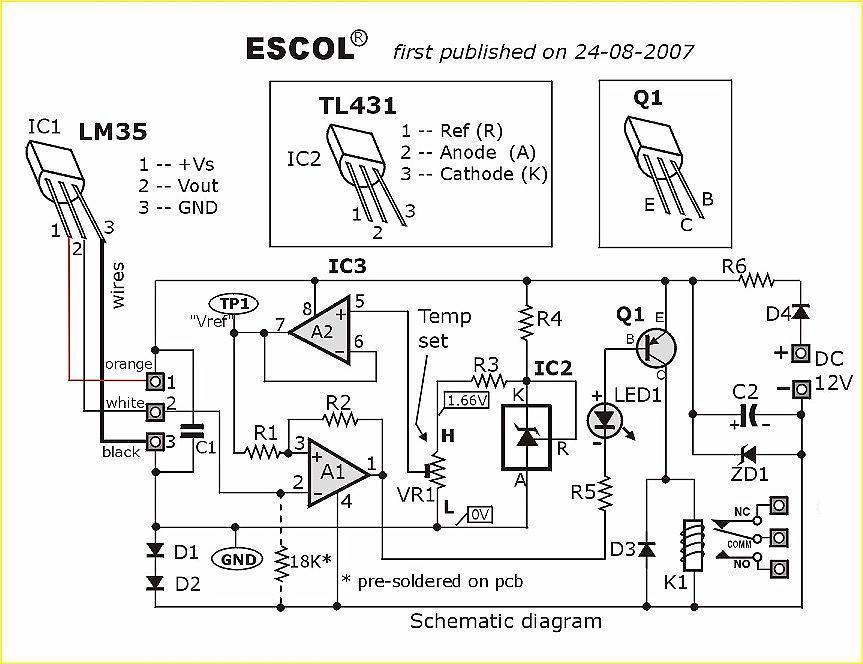
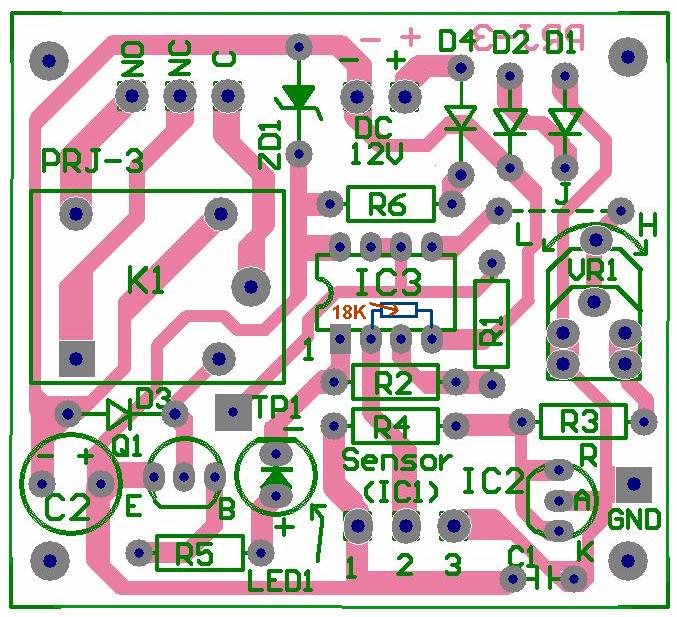
This is an electronic circuit that can be used as automatic temperature control application. The circuit switches a miniature relay ON or OFF according to the temperature detected by the one-chip temperature sensor LM35. When the LM35 detects a temperature higher than the preset level (set by VR1), the relay is actuated. When the temperature falls below the preset temperature, relay is de-energized. The circuit can be powered by any AC or DC 12V supply or battery (100mA min.)

Download : schematic, layout and PCB (pdf)
related search : Electronic circuit project, automatic application, temperauter controller, LM 35 (src)

Thursday, April 8, 2010

Essential Keyboard shortcuts in Ubuntu Linux

Keyboard Shortcuts will increse your efficiency of Computer user. Here you can see some essential shortcuts for ubuntu

Desktop Shortcuts

* Alt + F1: Open main menu.Use up/down/right/left arrow keys to select in Applications/Places/System.
* Alt + F2: Run Application.This will bring up a window,type command to run an application.
* Print Screen: Make a screenshot of whole screen.
* Alt + Print Screen:  Make a screenshot of current window.

Windows Short Cuts

* Alt + F4: Close the current window.
* Alt+F5 Returns window to 'normal' or previous size. 
* Alt+F7 Moves the current window 
* Alt+F8 Resizes current window
* Ctrl + Alt + d: This will minimize all windows and apps,and bring you to desktop.
* Alt + F9: Minimize the current window.
* Alt + F10: Maximize the current window.
* Alt + Tab: Switch in windows.

System Short Cuts
Ctrl + Alt + Delete   - Restart the computer immediately, without saving open files
Ctrl + Alt + BackSpace-Restart X Windows
Ctrl + Alt + Plus (numeric keypad) - Rotate through supported screen resolutions
Ctrl + Alt + Minus (numeric keypad) - Rotate backwards through supported screen resolutions
Ctrl + Alt + F1 --- F5   -  Open Virtual Terminal
Ctrl + Alt + F7 -  Return to Graphics screen from Virtual Terminal

How to install Latest Version of Wine in Ubuntu Linux


The Wine development release 1.1.42 is now available.

What's new in this release (see below for details):
- Support for shared 32/64-bit setups.
- Dwarf debug info support for better backtraces.
- More standard actions supported in MSI.
- Support for TIFF image format in WinCodecs.
- A number of Direct3D improvements.
- Shell fixes for better Internet Explorer support.
- Various bug fixes.

 How to install Wine in Ubuntu

First add the repository

$ sudo add-apt-repository ppa:ubuntu-wine/ppa

Now update the list
$ sudo apt-get update

Install Software
$ apt-get install wine

More Details

Wednesday, April 7, 2010

How to Install Openshot Non-Linear Video Editor in Ubuntu 9.10 Karmic Kola

The Most Popular Non-Linear  Video Editor for Linux Operating system is Openshot  Non-Linear  Video Editor. Openshot  Non-Linear  Video Editor.is included in the ubuntu 10.04 (lucid).


How to install in ubuntu 9.10
Add the Repository

$ sudo add-apt-repository ppa:openshot.devellopers/ppa

Then add the key
$ sudo apt-key adv --keyserver keyserver.ubuntu.com --recv-keys B9BA26FA

$ sudo apt-get update

$ sudo apt-get install openshot

Tuesday, April 6, 2010

iphone iphone iphone what are the features in iphone 3GS


First of all iphone 3GS is lightning fast.  You can shoot video, edit video  in portrait or landscape mode  and you can share video through  E-mail and Youtube, you can easily sync your video with your Mac and PC. It comes with a 3-megapixel camera with modern autofocus technology.

Voice Control can find the names  in your contacts list. Simply say a name to make a call. Or say a phone number. iPhone repeats your voice commands to confirm them, then dials away. You can also use voice control to play your songs and albums  with voice commands.

Maps on iphone is very attractive. iPhone 3GS finds your location quickly and accurately via GPS, Wi-Fi, and cellular towers. It will guide you to your correct location, View a list of turn-by-turn directions or follow a highlighted map route and track your progress with GPS.  Find locations by address or by keyword: Search for “coffee” to see every cafe near you.

Cut, copy, and paste words and photos, even between applications. Landscape Keyboard  more room to type.

Surf the web from practically anywhere. Now you can share the 3G connection on your iPhone with your Mac notebook or PC laptop.
iPhone includes built-in Nike + iPod support. Just slip the Nike + iPod Sensor  , this will be useful for sports person and exercise. Capture and share a thought, a memo, a meeting, or any audio recording on the go with the new Voice Memos application.

iPhone 3GS offers accessibility features to assist users who are visually or hearing impaired. These features include the VoiceOver screen reader, a Zoom feature, White on Black display options, Mono Audio, and more.

If you misplace your iPhone, Apple’s MobileMe service can help you find it.

Monday, April 5, 2010

Project : Radio Controlled Clock with USB

Electronic Project - Radio Controlled Clock with USB
Most widely spread DCF77 radio-controlled clock receiver are connected computer via the serial port but this electronic project will show you how to make DCF77 radio clock receiver connected via USB using a small 8-pin microcontroller ATtiny45. The project programed with the smart firmware called AVRUSB and AVR-CDC. With this firmware combination, the DCF77 receiver creates a serial port and is fully compatible to old-style true-serial-port ones. No software adaption is necessary.

Download : schematic and Firmwire

tags : Microcontroller AVR Project, radio-controlled clock receiver, USB (src)

Thursday, April 1, 2010

Card Reader using Microcontroller

Card Reader using Microcontroller
This is a simple version of Card Reader. Why? because this Magnetic Card Reader only in read only environment. It only read the information stored in magnetic card. The purpose of the project is used as card debugger. There are three main part in this project :
  • A reader to capture digital characters from the card
  • A RISC microcontroller to store data and check for errors
  • A display to relay the magstripe contents to the viewer
As processor it use microcontroller AVR ATtiny 2313. For Reader it uses Panasonic ZU-M2121S451 Reader. and for display use LCD 16x2.
The Magstripe (Track 2) Reader project can be used to view numerics stored a magnetic data card. Although there is no writeback ability, the device is very useful as a card debugger. The treatise will use an LCD character display to relay this data to the user. The circuit uses an AVR microcontroller and can modified to work with similar RISC controllers.
Although the card reader can't write back to magnetic card, I guess this is a one of good reference to learn how card reader work. For download the reference clik here (zip file)or visit this link
Thanks to Brady Mayes for great card reader based on microcontroller.